v2.7.12 new core · open source · native macOS · pure Swift

Code, run & forget.

Retrieve every draft you keep — a fast, focused macOS editor with a calm dark workspace.

Requires macOS 26 or later · Apple silicon

The whole idea

Open anything.
Keep everything.

Nyxd Editor began as two stubborn wishes — and it honours both, completely.

Open anything you’re handed. A zip, a binary, a PDF, a .docx, an unknown blob — there’s always a way in. Drop it on the menu-bar icon and it opens. Every time.

Lose nothing you write. Code, a credential, a command, an email draft, a stray comment — saved the instant it exists, and found again in a keystroke.

The actual app

No mockups.
These are screenshots.

Every editor window elsewhere on this page is drawn in CSS. These four aren't. Read the status bar in each one.

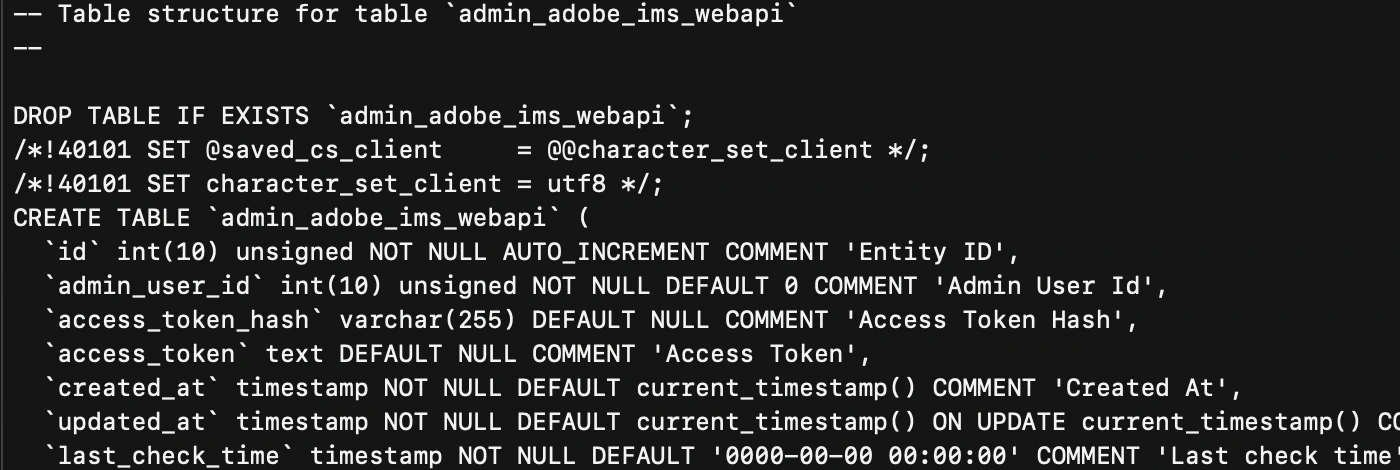
6.98 GB · 70 ms

Open before you let go of the mouse.

Not a summary, not the first megabyte — the whole file, scrollable end to end, highlighted, caret already in it. Nothing is loaded into RAM: the bytes stay memory-mapped and only the lines on screen are ever drawn. 70 ms is what the app reported for that open. Run through the benchmark harness instead, this exact file measures 167 ms to usable, median of five — a stricter clock on the same 6.98 GB.
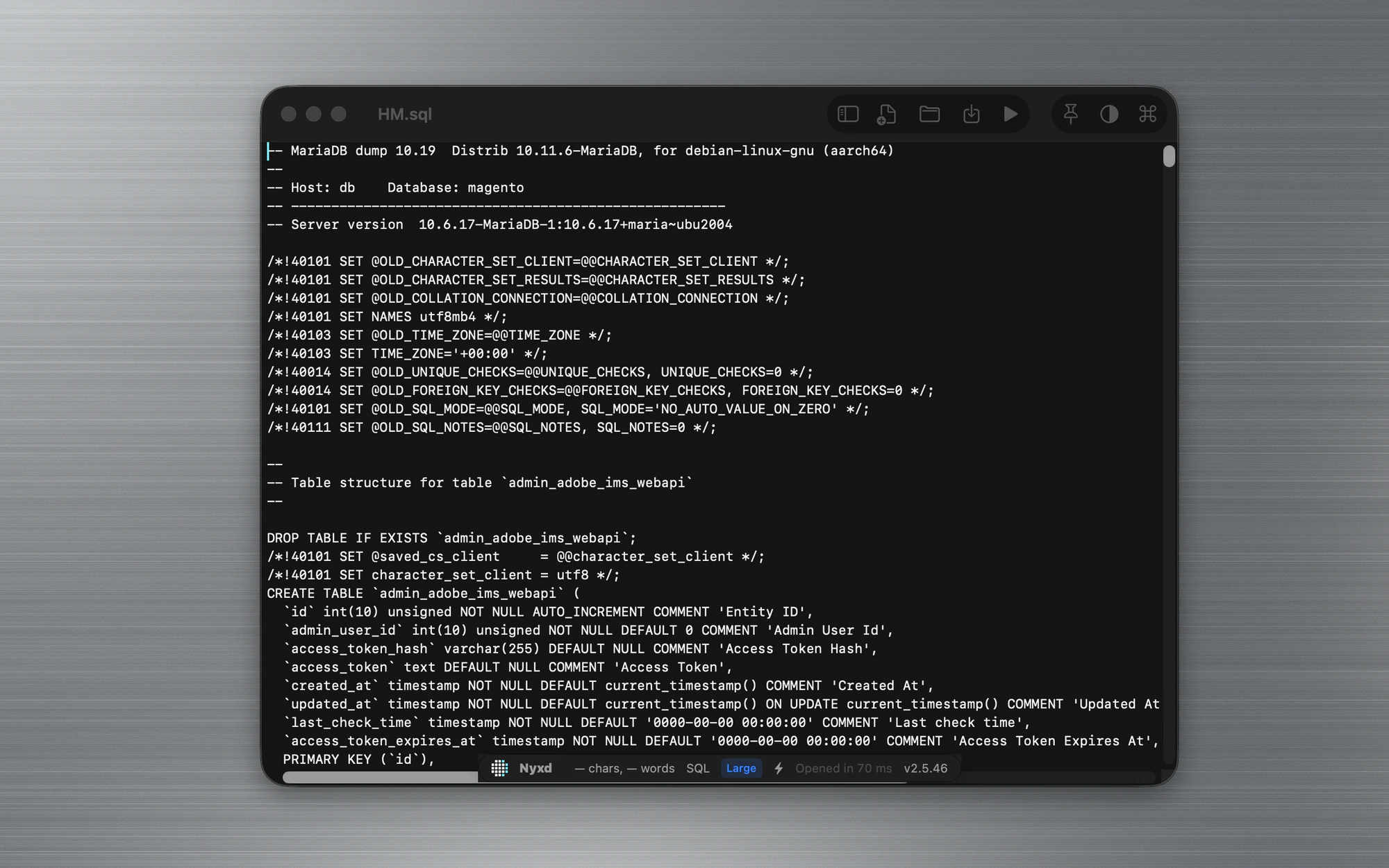
Nyxd Editor showing a 6.98 GB MariaDB dump, syntax highlighted, with a Large badge and an open time of 70 milliseconds in the status bar
Anything

When there's no text in it, you get the bytes.

Offsets down the left, decoded ASCII down the right, and the file's magic bytes sitting on line one: .PNG … IHDR. Nothing to install, nothing to configure, and no "cannot open file" dialog.
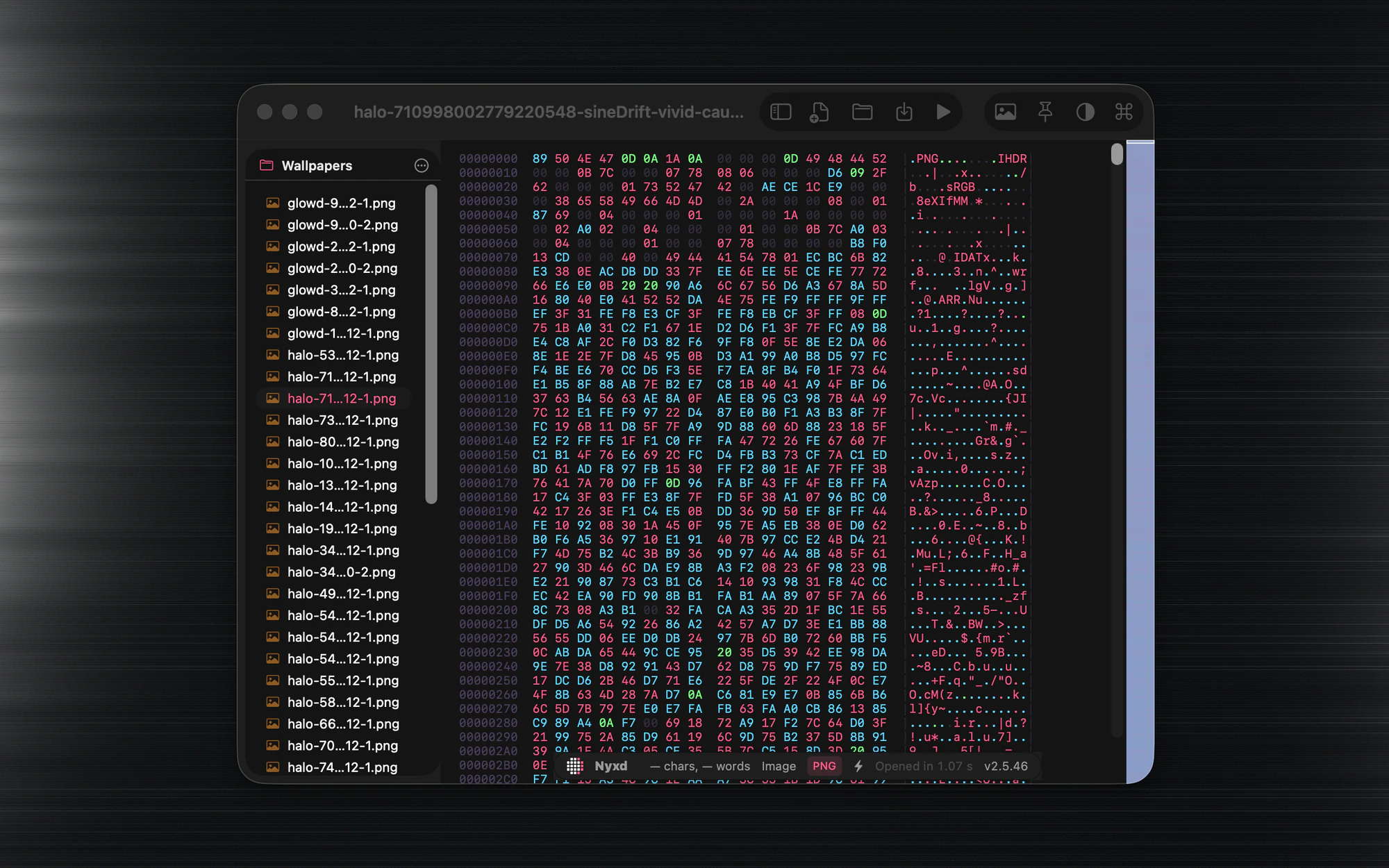
Nyxd Editor showing a PNG as a hex and ASCII dump, PNG and IHDR magic bytes visible at offset zero, with a folder sidebar listing the other wallpapers
The same file

And one keystroke later, the picture.

Transparency drawn as a checkerboard instead of guessed at, and the details already on screen — PNG · 2940×1912 · 8-bit RGBA · 4.2 MB — no Get Info, no round trip. Open the folder and that sidebar becomes the quickest image browser on your machine: arrow down the list, each one is simply there.
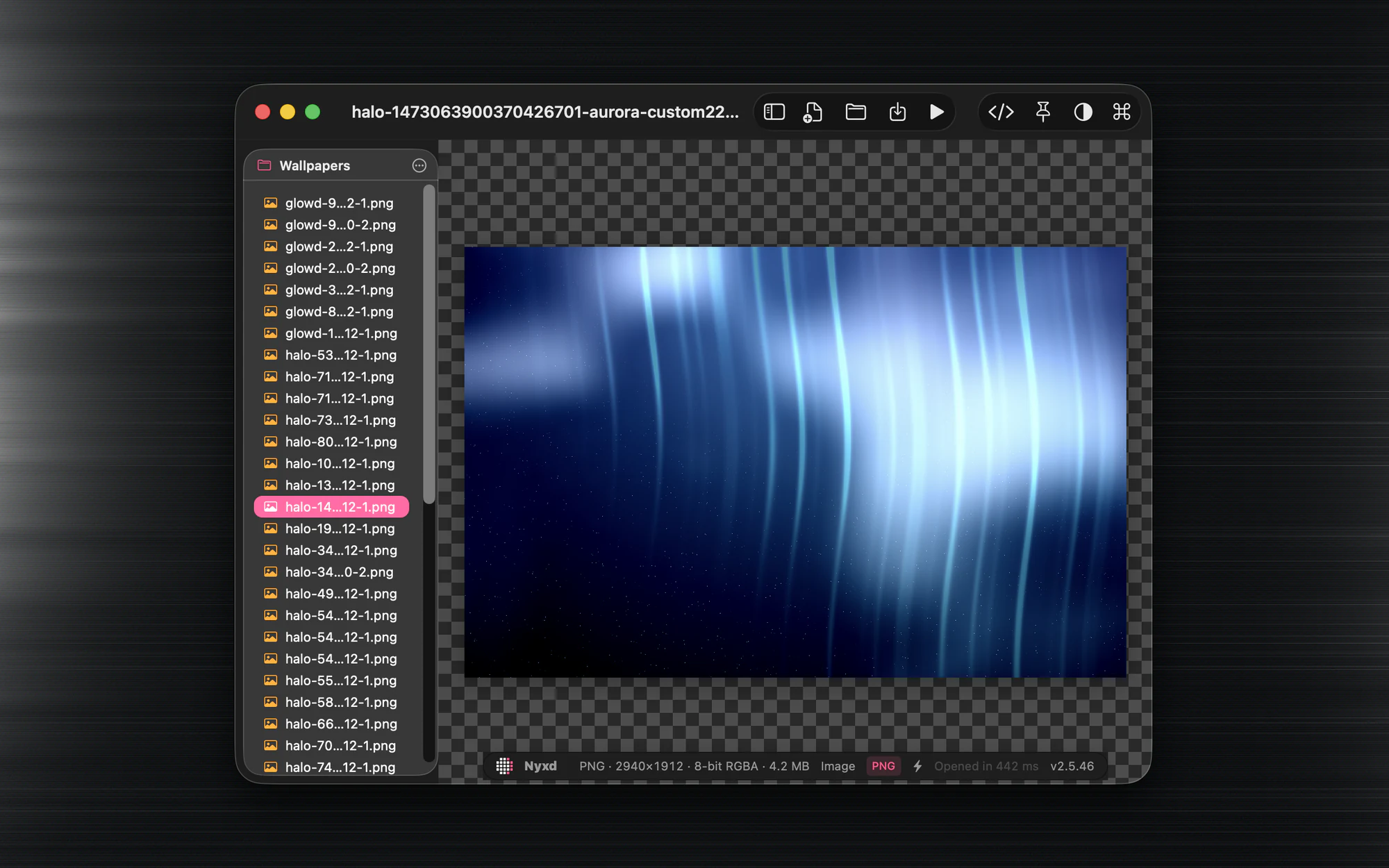
The same PNG rendered as an image on a transparency checkerboard, with format, dimensions, bit depth and file size in the status bar
Readable

Markdown, set like a page.

Not source with the asterisks left in, and not a preview in a second window. ⌘ + and ⌘ − size it to your eyes and the typeface follows; </> drops you back into the source instantly.
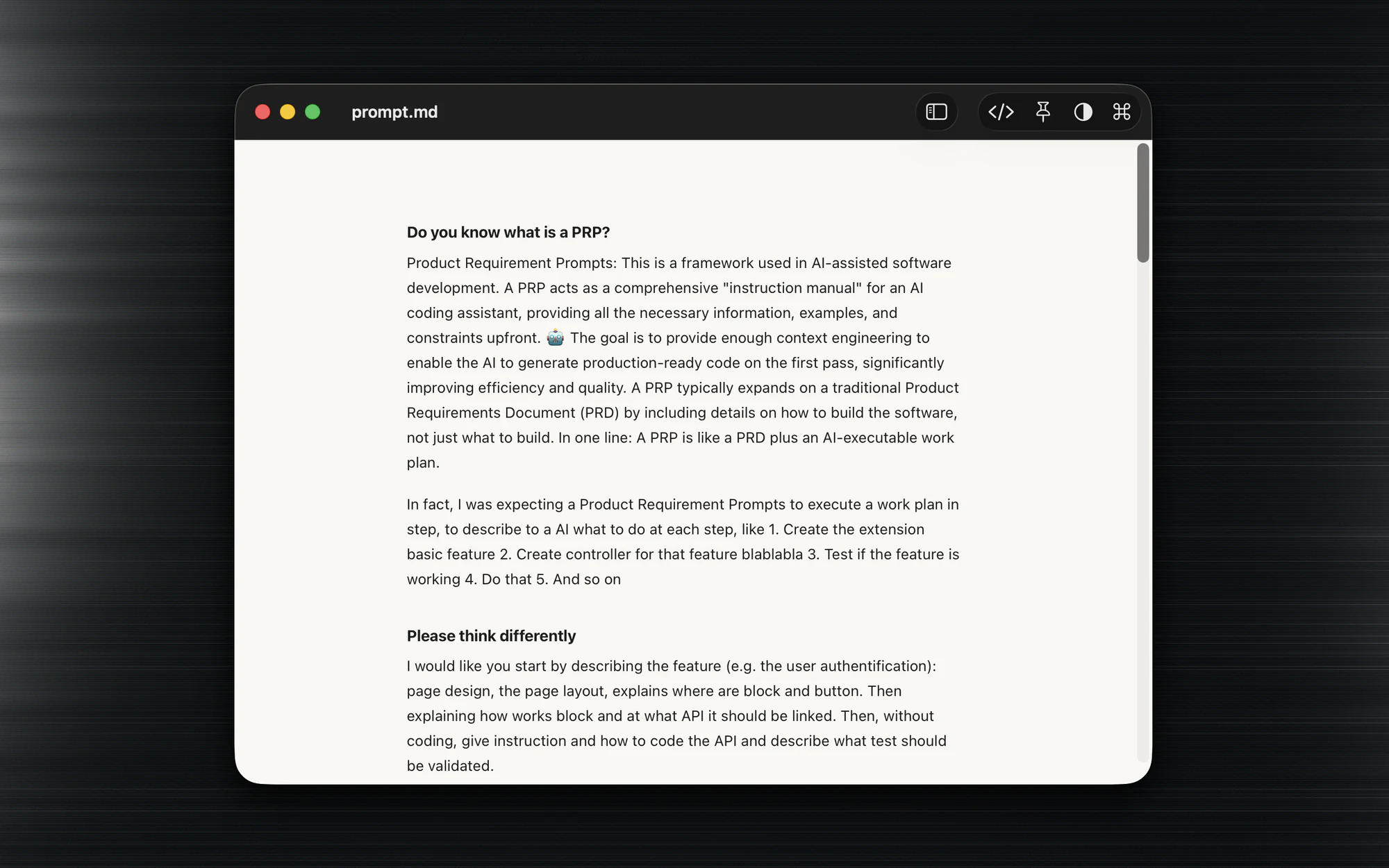
Nyxd Editor rendering a Markdown document as clean typeset prose on a light page

Every byte, addressed.

Offsets down the left, sixteen bytes to a row, decoded ASCII down the right — and the file's magic number sitting on line one.
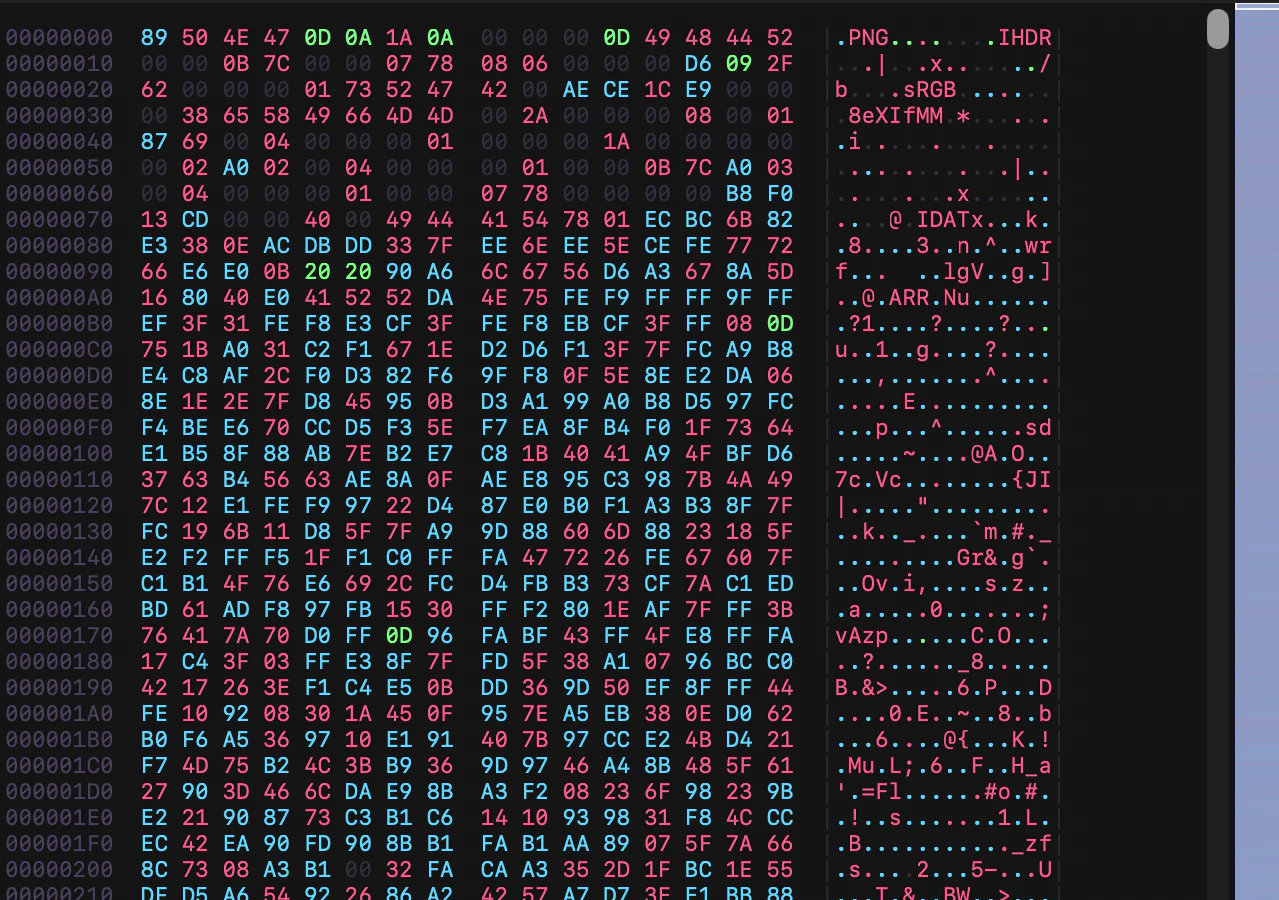
Close-up of Nyxd Editor's hex view: offset column, hex bytes, and the decoded ASCII gutter showing .PNG and IHDR

Every command, one keystroke away.

⌘ P reaches every command, every theme and every file in the folder, over whatever you happen to be reading.

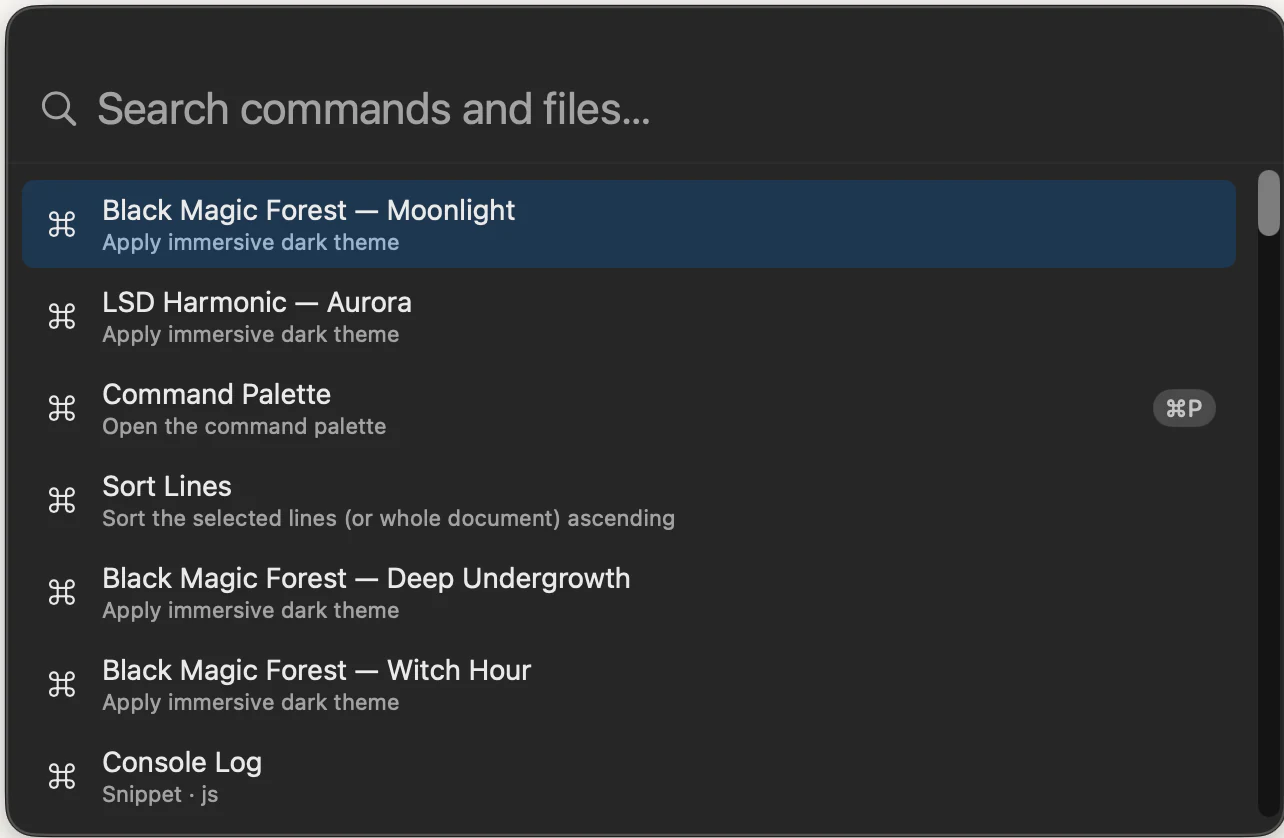
Close-up of a Markdown document rendered as typeset prose Nyxd Editor's command palette open, listing themes, Sort Lines and Command Palette with its ⌘P shortcut

The fastest picture browser you already have.

Open the folder and arrow down it. Every image is simply there, transparency drawn rather than guessed at, and the format read out for you.
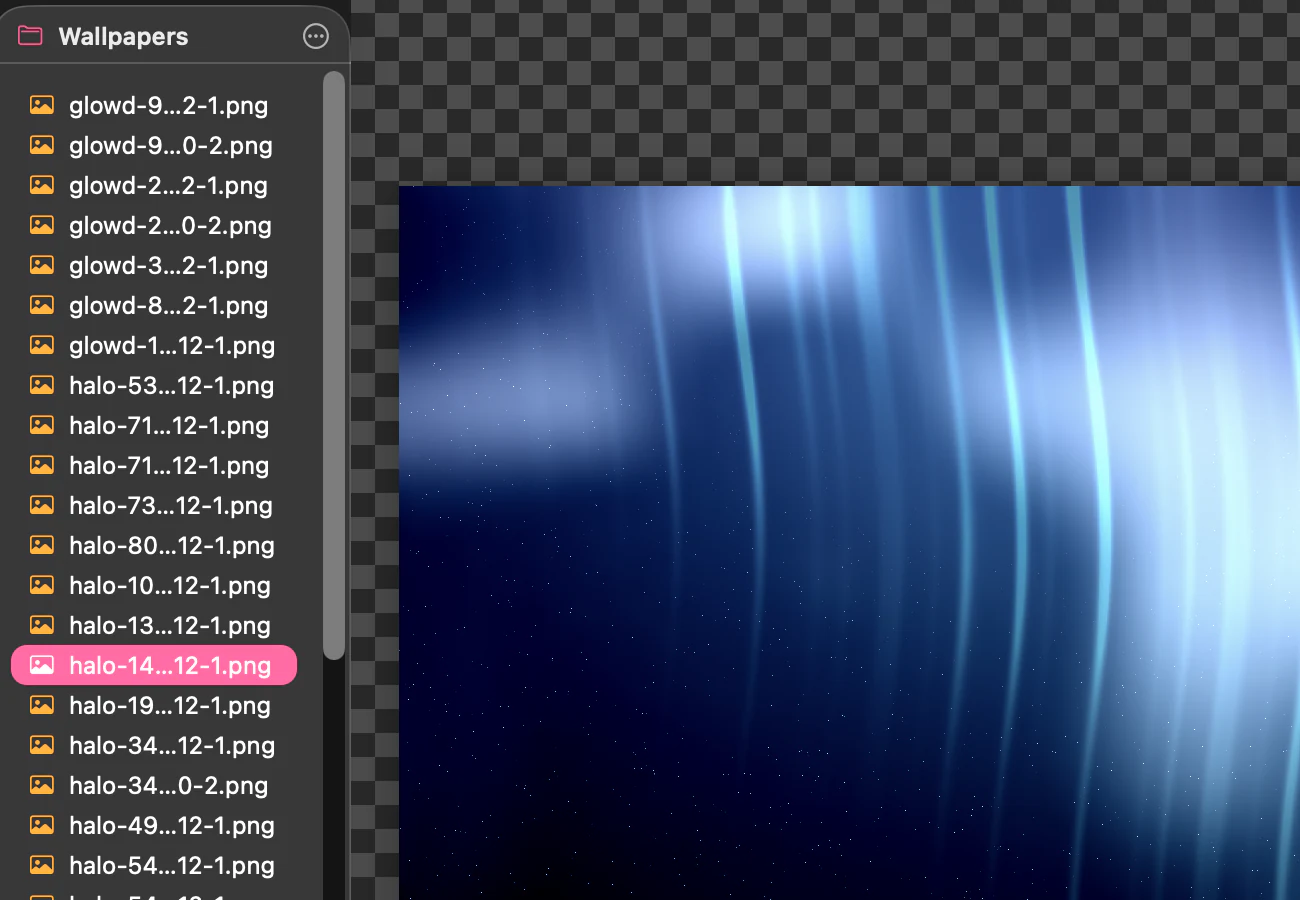

Close-up of Nyxd Editor's folder sidebar beside an image drawn on a transparency checkerboard Nyxd Editor's status bar reading PNG, 2940 by 1912, 8-bit RGBA, 4.2 MB, opened in 442 milliseconds

Six point nine eight gigabytes.

Detected as a MariaDB dump, highlighted and mapped, with nothing installed — and the status bar telling you exactly what it cost.

Close-up of a MariaDB dump in Nyxd Editor showing a CREATE TABLE statement, syntax highlighted Nyxd Editor's status bar reading SQL, a Large badge, and opened in 70 milliseconds

We'd be glad if Nyxd Editor ended up as your fallback editor — the one you reach for when nothing else will open the thing. Every file, every container, every binary, at any size. And, we think, the fastest app in that category.

Captured on an Apple M2 from builds 2.5.46 and 2.5.53. The four frames above are whole windows, untouched. The close-ups are regions lifted from those same captures — magnified, never redrawn.

v2 · CoreNG engine

Built from zero — for raw speed.

Not a fork bolted onto an aging core. Nyxd Editor’s v2 engine was written from the very first line with one priority: maximum performance. Text streams straight from a memory-mapped piece table instead of being loaded whole — so launch is instant in most cases, and even a 1 GB file opens before you blink.

305ms
Launch
Measured 304.9 ms — 5 ms over our own 300 ms gate. Being fixed, not hidden.
92ms
Open a 1 GB file
Streamed, not loaded — and faster than the 10k-line source beside it.
~10MB
RAM for that 1 GB file
0.01× the file size resident — it never eats your memory.
1.09ms
Keystroke latency
Median, at 1,000,000 lines. The gate allows 8 ms.
60fps
Scroll a million lines
Viewport-only rendering — measured at 60.0 fps, zero blank frames.
42ms
Command palette
Key to visible. Under the 50 ms gate, with room to spare.

Every figure above is a real BenchKit gate result from one release build on one Apple M2 — the same run shown in the table below. Not targets, not projections. Real numbers vary with disk, file and machine; the architecture is built so the common case is the fast case.

Performance

Fast. Measured. Not claimed.

These are Nyxd Editor's own BenchKit gates — the suite that has to pass before a release ships — run on this machine, at this version. Two of them currently don't pass. They're in the table anyway.

92ms
to open a 1 GB log
1.09ms
keystroke at 1M lines
10MB
resident for that 1 GB
3.1MB
download, zipped
GateTargetMeasured
P2open a 1 GB log — to usable< 1 s92 mspass
P2open the 6.98 GB MariaDB dump — to usable< 1 s167 mspass
P3keystroke latency at 1,000,000 lines — median< 8 ms1.09 mspass
P4scroll 1,000,000 lines — zero blank frames60 fps60.0 fpspass
P9resident memory with the 1 GB file open≤ 1.5×0.01×pass
P12command palette — key to visible< 50 ms42.3 mspass
P1cold launch to interactive — 5 ms over the bar< 300 ms304.9 msover
P5first paint of a 10,000-line Swift file< 100 ms115.8 msover

A real 6.98 GB MariaDB dump reaches usable in 167 ms, and scrolling it end to end costs 2 ms more. Both are faster than the 10,000-line Swift file beside them, because huge files take the viewport path: only the lines on screen are drawn, and syntax highlighting is skipped entirely. Small files get the highlighter, and pay for it. Resident memory with the dump open was 0.03 GB — 0.004× the file, because the bytes are memory-mapped and never read as a whole.

Measured 31 July 2026 via BENCH_HUGE=1 swift run -c release Bench e2e on an Apple M2 running macOS 26.5.2 — release build of nyxd 2.5.64. Every gate but one runs against BenchKit's own generated corpus; the 6.98 GB row is the same P2 gate pointed at a real MariaDB dump (6,983,358,724 bytes), and its figure is the median of five consecutive runs, which spanned 162–205 ms. Sizes from the signed nyxd.app bundle (8.5 MB on disk, 3.1 MB zipped). One machine: your disk, file and hardware will move these.

It’s the little things.

A few of the details Nyxd Editor gets right for you every day — animated by hand, never stock.

A few features are marked Direct download only — they run other programs on your Mac (an interpreter, an unarchiver, a formatter), and Apple’s App Store sandbox forbids that outright. There is no setting or permission that turns them on. Everything else is identical in both builds.

Multi-Cursor
Drop a cursor on each line, then edit them all at once.
One-Button Run
Runs scripts with the interpreter auto-detected, or reopens office docs in their native app — always saving first.
Direct download only
Find & Replace
Live match count, regex, case-preserving replace.
Twelve Dark Themes
The whole UI tints to the active theme's accent.
.docx
Open Anything
Drag & drop any archive, Office doc or binary — open in a second, then run it.
Archives, Office & Run: direct download only
1.0 GB
✓ Loaded instantly
Opens 1 GB file, Stays Fluid
Gigabyte files load instantly and scroll smooth — with search & replace built for speed.
Minimap
A scaled overview on the right edge that keeps pace as you scroll.
Reformat Code
Ctrl+Opt+F unfolds a minified blob into clean lines. One undo.
JSON & XML everywhere · other languages: direct download only
9:41
notes.md
Menu-Bar Favorites
Always in your menu bar, ready to open a file instantly — drop one to open it, pin favorites, browse recents. Drop a text selection from any app and it becomes a new named draft, syntax already coloured.
Editor Grid
Optional graph-paper grid with square cells, colored from the theme.
Syntax Highlighting
Fast, accurate highlighting for 16 languages — built in, nothing to install.
quick-sort.py
Run
Paste & Run
Paste a snippet — the language is detected instantly, so you can just hit Run.
Detection everywhere · Run: direct download only
DOCX XLSX PPTX ODT EPUB KEY UNZIP ZIP
Unpack & Repack
Most modern formats are just ZIP archives in disguise — Nyxd Editor unzips them, lets you edit, then zips them back.
Direct download only
Configs & Dotfiles, Too
Highlighting reaches beyond code — bashrc, zshrc, histories, nginx & major server configs included.
$
Pin on Top
Float a compact editor above any app — paste a command into the terminal, copy values into a spreadsheet, fix small things in a loop.
no save prompt
Silent Close
Close a draft and it's already archived to your folder — no “Save changes?” dialog, ever.
notes.md
Saved at 15:21:11
became read-only
couldn’t save — still yours
It Tells You
Saved, deleted underneath you, gone read-only, or a save that failed — a pill says which, in two seconds, and an error looks like one. Nothing that can lose your bytes happens quietly.
Untitled
n · · · · ⌘Nnew draft, saved already ⌘Kfind anything you wrote ⌥⌘Oopen the path on line 1
An Empty Window Says Hello
A new document names the three keys worth knowing first. It is drawn over the page, never typed into your file — so it is never saved, never searched, never counted. The first byte erases it.
Name
Title-Bar Rename
Rename from the title-bar popover and the file on disk follows — title, Recents and editor all update with it.
12
48
73
96
Find Results List
Find All opens a clickable drawer — every match with its line number and context; click to jump, ↑↓ to walk them.
#sorting #python #recursive
Auto-Tags & Memory
On-device embeddings read every draft and tag it for you — a semantic signal that powers typo-proof search, all offline.
quick-sort.py98%
sorting-notes.md71%
bubble_sort.swift64%
Typo-Proof Search
Type it rough and misspelled — an ensemble of exact, prefix, stem, typo and trigram signals still surfaces the right draft.
DOCX XLSX PDF
Office Docs → Text
Word, Excel, PowerPoint, PDF — extracted to readable text and CSV you can actually edit, search and run.
Direct download only
ecommerce.dbbinary
000053 51 4C 69 74 65SQLite
000620 66 6F 72 6D 61 forma
000C74 20 33 00 10 00t 3···
001202 02 0C 40 20 20···@··
006000 2E 8D F8 0D 0F······
Peek Inside Any Binary
Open a database, image or executable and Nyxd Editor decodes it to a hex + ASCII dump — magic bytes and structure, right there.
9:41
any app
selected text
bearer-token .py
Drop Text → New Draft
Select text in any app — a web page, Notes, a PDF — and drag it onto the menu-bar icon. It lands as a real draft, named from what you dropped and already syntax-coloured.
Capture

Write it — it's already saved.

Draft some code, jot a note, or just start typing. Everything you write is archived to your folder the moment it exists — no Save dialog, no lost scratch. Organized on disk, easy to manage, always yours.

~/nyxd
+1
Retrieve

Find it, even when you can't spell it.

A search engine built on Apple's Swift frameworks indexes every draft. Type a rough, half-remembered, typo-ridden query and the ensemble ranker still surfaces the right snippet — exact, prefix, stem, typo, trigram and on-device semantic signals, combined.

Read how we did it →

qik srt
quick-sort.py98%
sorting-notes.md71%
bubble_sort.swift64%

Twelve shades of dark.

UI controls — buttons, toggles, sliders, focus rings — pick up the active theme's accent instead of the macOS default.

Black Magic Forest Future Neon LSD Harmonic Sand and Sun Deep Tide + eight more

Honestly, they're so good-looking you'll probably want to devour every last one. Don't say we didn't warn you.